> ## Documentation Index
> Fetch the complete documentation index at: https://docs.unstructured.io/llms.txt
> Use this file to discover all available pages before exploring further.
# Regex
> The Regex method extracts structured data fields from partitioned documents using named regular-expression patterns, without requiring a language model.
export const regex_flavor_2 = "Python"
export const regex_flavor_1 = "Python"
export const regex_flavor_0 = "Python"
*Type*: `structured_data_extractor`
*Subtype*: `regex`
## Settings
A list of objects, each defining one extraction field. Each object must contain:
* `name`: The field name for the extracted value.
* `pattern`: A JSON-escaped regex pattern. Pattern syntax follows Python [`re`](https://docs.python.org/3/library/re.html).
The mode in which to output the extracted data. Allowed values:
* `elements_with_extracted_data`: Output the extracted data as JSON into an `extracted_data` field inside of `metadata` within a parent `DocumentData` element, followed by other built-in Unstructured document elements.
* `extracted_data_only`: Output only the extracted data as JSON, without any parent `DocumentData` element or any other built-in Unstructured document elements.
Default: `elements_with_extracted_data`.
## Regex output
Each of the `name` / `pattern` pairs in `regex_patterns` is extracted as an array of the matched values. The `name` field value is the name of the array in the extracted output.
See **Example settings** and **Example extracted output** below.
**Example settings:**
```json theme={null}
{
"name": "Regex Extractor",
"type": "structured_data_extractor",
"subtype": "regex",
"settings": {
"regex_patterns": [
{
"name": "Price in dollars",
"pattern": "\\$\\d{1,3}(?:,\\d{3})*(?:\\.\\d{1,2})?"
}
],
"output_mode": "extracted_data_only"
}
}
```
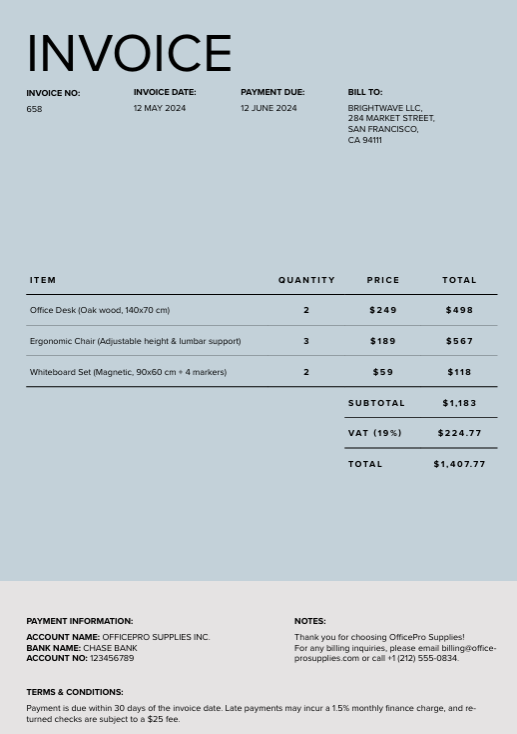
**Note:** The `output_mode` field appears in the example settings above so the `settings` object is shown in full. It does not affect the extracted values illustrated in this example of the `Price in dollars` matches.
The extracted output includes the array `Price in dollars`.
The resulting array contains the values in the input document that match the regex `pattern`.
**Example extracted output (partial):**
```json theme={null}
{
"Price in dollars": [
"$249",
"$498",
"$189",
"$567",
"$59",
"$118",
"$1,183",
"$224.77",
"$1,407.77",
"$25"
],
...
}
```
This example displays the output array for the following PDF file ([download this file](https://raw.githubusercontent.com/Unstructured-IO/docs-samples/main/pdf/invoice.pdf)).
The **example settings** above contain a JSON-escaped regex pattern.
| Context | Pattern |
| ----------- | ----------------------------------------- |
| Raw regex | `\$\d{1,3}(?:,\d{3})*(?:\.\d{1,2})?` |
| JSON string | `\\$\\d{1,3}(?:,\\d{3})*(?:\\.\\d{1,2})?` |
You can verify the list of matches for the regex `pattern` with a tool like [regex101](https://regex101.com/), with the flavor set to *{regex_flavor_0}*. Enter the raw regex string: `\$\d{1,3}(?:,\d{3})*(?:\.\d{1,2})?`
## Regex pattern examples
The following are raw regex examples, shown without JSON escaping (as you would type them in a regex tester, not inside a JSON string value).
* Dollar amounts: `\$\d{1,3}(?:,\d{3})*(?:\.\d{1,2})?`
* This pattern matches dollar amounts with a dollar sign immediately followed by digits (no space after `$`), comma-separated thousands, and an optional decimal part.
* Examples that match: `$2,345.99`, `$1,000,000`
* Examples that don't match: `$ 2,345.99` (space follows the `$`), `1,000,000` (no `$`)
* Another string format: `^[A-Z]{2}-\d{2}-\d{4}$` - This pattern matches a string with two capital letters followed by two digits and a four-digit number, separated by dashes (example: `XY-12-1234`).
* The `^` and `$` characters in this pattern are *anchors*. Use them to require that the entire string matches the pattern.
* Do not use anchors if you need to extract values inline in text (like `Invoice id XY-12-1234`, `Patient record AB-34-5678`, `ID: AA-00-0000`)
* Use anchors when the whole string must match the pattern exactly, with no extra text before or after (for example, `XY-12-1234` alone).
* Examples that match: `XY-12-1234`, `AA-00-0000`
* Examples that don't match: `Invoice XY-12-1234`, `XY-12-1234 ` (trailing space), `xy-12-1234`
You can test and refine patterns by using tools such as [regex101](https://regex101.com/) with the flavor set to {regex_flavor_1}.
## Regex escaping and JSON escaping
When using regex patterns in API requests, you may need two types of escaping:
* **Regex escaping** – required by the regex engine
* **JSON escaping** – required by the JSON string format
**Raw and escaped JSON examples:**
| Context | Pattern |
| ----------- | ----------------------------------------- |
| Raw regex | `\$\d{1,3}(?:,\d{3})*(?:\.\d{1,2})?` |
| JSON string | `\\$\\d{1,3}(?:,\\d{3})*(?:\\.\\d{1,2})?` |
| Raw regex | `^[A-Z]{2}-\d{2}-\d{4}$` |
| JSON string | `^[A-Z]{2}-\\d{2}-\\d{4}$` |
**When to use each:**
* Use **regex escaping** when writing the pattern. This is considered *raw* regex.
* `\$` → literal dollar sign
* `\.` → literal decimal point
* Use **JSON escaping** when sending the pattern in an API request. You would add the JSON escapes to the raw regex, which may contain escaped literals like the examples above.
* Each `\` becomes `\\`
From the visual schema editor on the **Start** page or in the **workflow editor**, use **Export schema as JSON** (from the three-dots menu) to download the schema with patterns **JSON-escaped** in the file. Or use **Upload JSON** to load a schema file so patterns show **raw** in the editor again.
Write and test your regex first, then convert it to JSON by doubling each backslash. You can test and refine patterns by using tools such as [regex101](https://regex101.com/) with the flavor set to {regex_flavor_2}.
[Learn more](/concepts/structured-data-extractor/data-extractor).
```python Python SDK theme={null}
extract_workflow_node = WorkflowNode(
name="Regex Extractor",
type="structured_data_extractor",
subtype="regex",
settings={
"regex_patterns": [
{
"name": "",
"pattern": ""
},
{
"name": "",
"pattern": ""
}
],
"output_mode": ""
}
)
```
```json cURL theme={null}
{
"name": "Regex Extractor",
"type": "structured_data_extractor",
"subtype": "regex",
"settings": {
"regex_patterns": [
{
"name": "",
"pattern": ""
},
{
"name": "",
"pattern": ""
}
],
"output_mode": ""
}
}
```