> ## Documentation Index
> Fetch the complete documentation index at: https://docs.unstructured.io/llms.txt
> Use this file to discover all available pages before exploring further.
# Concepts and architecture
This topic uses *private connectivity* as a general term for AWS PrivateLink and Azure Private Link.
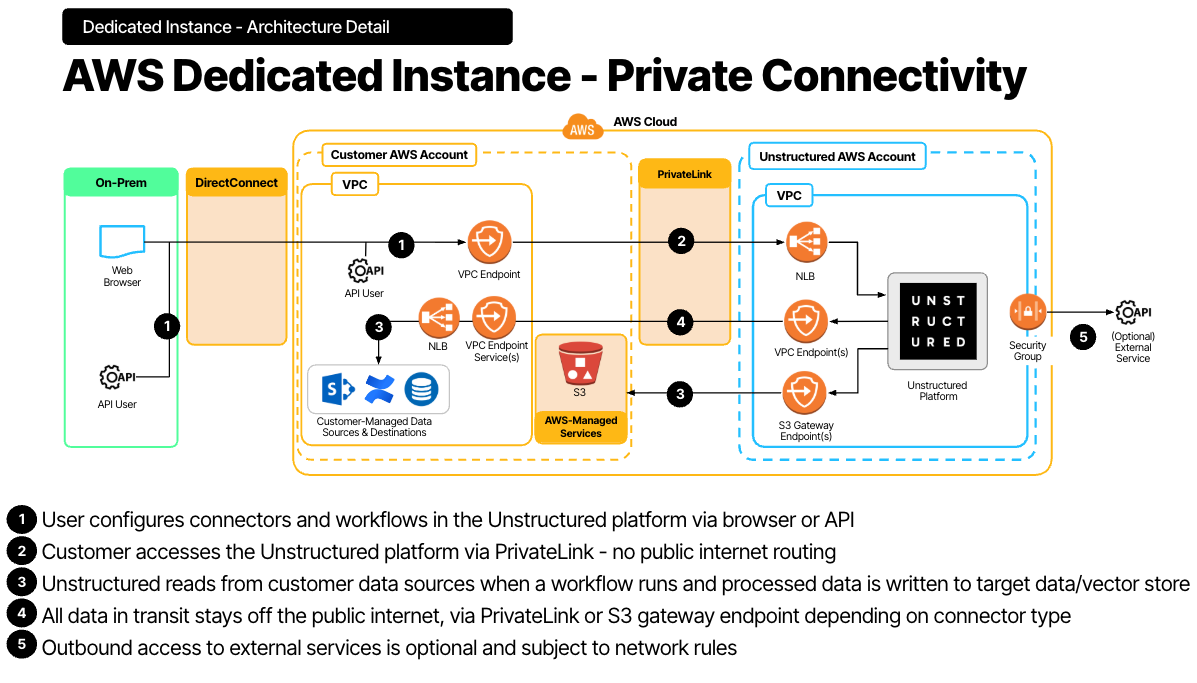
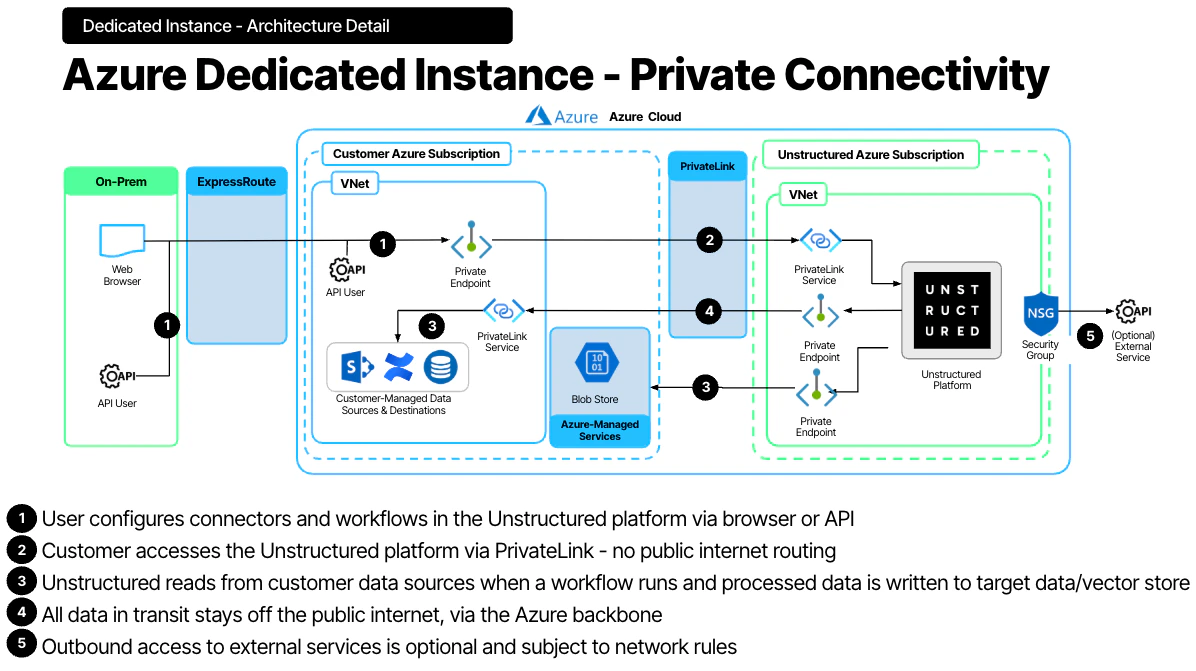
A **dedicated instance** is an isolated Unstructured deployment. When private connectivity is enabled, traffic between the customer environment and Unstructured stays on private network paths instead of traversing the public internet.
The diagrams below show the architecture for dedicated instances with private connectivity enabled.
### AWS dedicated instance with AWS PrivateLink
 ### Azure dedicated instance with Azure Private Link
 ## Private connectivity by cloud provider
**AWS private connectivity** uses AWS PrivateLink interface endpoints to connect the customer VPC to the Unstructured private network without traversing the public internet.
**Azure private connectivity** uses Azure Private Link to connect the customer VNet to the Unstructured private network while keeping traffic on the Microsoft backbone instead of the public internet.
## Traffic directions
Private connectivity can be configured in one or both directions:
* **Customer → Unstructured** — Customer users and applications access Unstructured Pipelines and the API through private endpoints in the customer VPC or VNet.
* **Unstructured → Customer** — Unstructured accesses customer data sources, such as S3 buckets, databases, and vector stores, through private endpoints in the Unstructured VPC or VNet.
If you enforce strict outbound controls, configure both directions so traffic remains private end to end.
## Private connectivity by cloud provider
**AWS private connectivity** uses AWS PrivateLink interface endpoints to connect the customer VPC to the Unstructured private network without traversing the public internet.
**Azure private connectivity** uses Azure Private Link to connect the customer VNet to the Unstructured private network while keeping traffic on the Microsoft backbone instead of the public internet.
## Traffic directions
Private connectivity can be configured in one or both directions:
* **Customer → Unstructured** — Customer users and applications access Unstructured Pipelines and the API through private endpoints in the customer VPC or VNet.
* **Unstructured → Customer** — Unstructured accesses customer data sources, such as S3 buckets, databases, and vector stores, through private endpoints in the Unstructured VPC or VNet.
If you enforce strict outbound controls, configure both directions so traffic remains private end to end.