> ## Documentation Index
> Fetch the complete documentation index at: https://docs.unstructured.io/llms.txt
> Use this file to discover all available pages before exploring further.
> ## Agent Instructions
> ## Agent quick links and documentation index
> Fetch key links about the MCP server, SDK, and API at: https://docs.unstructured.io/agent-guide.md
> Then fetch the complete documentation index at: https://docs.unstructured.io/llms.txt
> Use these two files to discover all available pages before exploring further.
# Python quickstart
> From login to structured JSON in about 5 minutes, with Unstructured and Python.
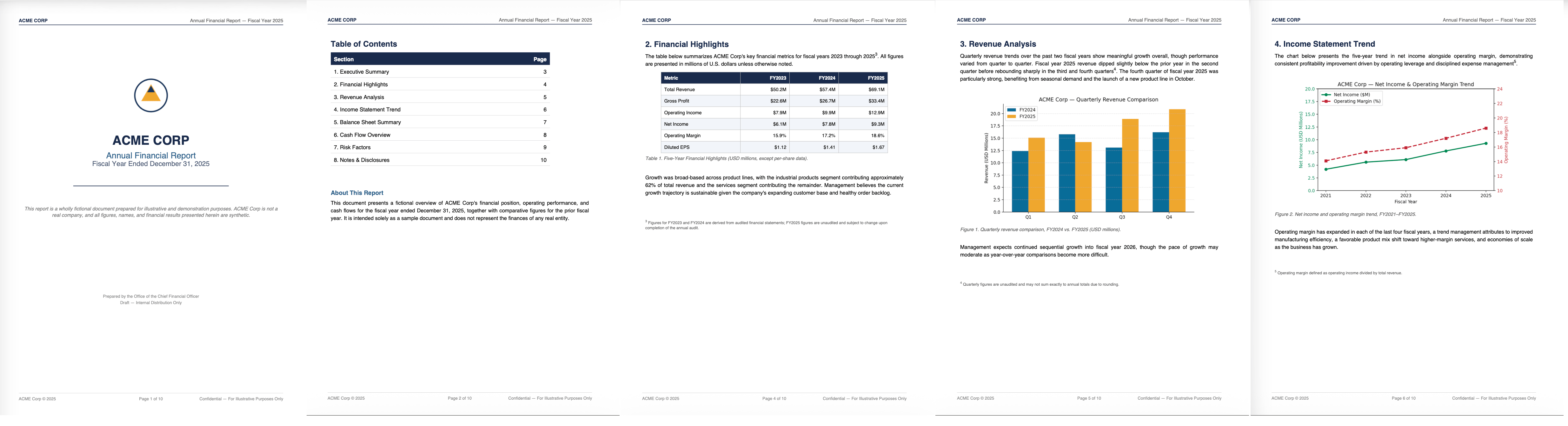
This quickstart parses an example company annual report with a sample Python script and the Unstructured API. Later, you'll extract structured fields from an example medical intake form.
Each example below uses one PDF file so you can finish quickly. The sample scripts also handle multiple files in a directory, which you can try later with your own files.
This file contains a range of unstructured text and graphic elements, such as tables, charts, graphs, and handwriting.
 ## Parse the file
*Estimated time from creating your account to opening the parse results file: about 5 minutes*
Follow these steps to run the script and see the parsed results.
This script uses the [job endpoints](/api-reference/api/job/job-apis) to create the job, poll its status, and download the results. The `create job` endpoint uses only a `Partitioner` node to parse the file into Unstructured's standard document elements.
These `Partitioner` settings activate the [Auto strategy](/api-reference/workflow/nodes/transform/partitioner-auto). Auto evaluates each page and routes it to Fast, High Res, or VLM partitioning, balancing quality, speed, and cost.
Finally, the `download job output` endpoint downloads the parsed output to `OUTPUT_DIR` where you can view it as a JSON file.
1. Go to [Unstructured's sign-up page](https://transform.unstructured.io) and click **Register**. Follow the on-screen instructions to sign up, then sign in.
2. In the sidebar, click **API Keys**, then click the copy icon next to **API Key**.
This requires Python 3.11 or later. Check your version:
```bash theme={null}
python3 --version
```
Install the SDK with pip:
```bash theme={null}
pip install "unstructured-client>=0.46.2"
```
Download the [ACME Corp Annual Report](https://raw.githubusercontent.com/Unstructured-IO/docs-samples/main/pdf/ACME_Corp_Financial_Report.pdf).
Download the sample script
## Parse the file
*Estimated time from creating your account to opening the parse results file: about 5 minutes*
Follow these steps to run the script and see the parsed results.
This script uses the [job endpoints](/api-reference/api/job/job-apis) to create the job, poll its status, and download the results. The `create job` endpoint uses only a `Partitioner` node to parse the file into Unstructured's standard document elements.
These `Partitioner` settings activate the [Auto strategy](/api-reference/workflow/nodes/transform/partitioner-auto). Auto evaluates each page and routes it to Fast, High Res, or VLM partitioning, balancing quality, speed, and cost.
Finally, the `download job output` endpoint downloads the parsed output to `OUTPUT_DIR` where you can view it as a JSON file.
1. Go to [Unstructured's sign-up page](https://transform.unstructured.io) and click **Register**. Follow the on-screen instructions to sign up, then sign in.
2. In the sidebar, click **API Keys**, then click the copy icon next to **API Key**.
This requires Python 3.11 or later. Check your version:
```bash theme={null}
python3 --version
```
Install the SDK with pip:
```bash theme={null}
pip install "unstructured-client>=0.46.2"
```
Download the [ACME Corp Annual Report](https://raw.githubusercontent.com/Unstructured-IO/docs-samples/main/pdf/ACME_Corp_Financial_Report.pdf).
Download the sample script partition-quickstart.py, or save the following script into a file.
Before you run the script, set `API_KEY`, `INPUT_DIR`, and `OUTPUT_DIR` near the top. The script already sets `API_URL`.
* Point `INPUT_DIR` at a folder that contains only the file you want to process. The script processes every file it finds there.
* Use a different folder for `OUTPUT_DIR`. Otherwise, on a second run, the script also tries to process the JSON files it already saved there.
```python theme={null}
import json
import mimetypes
import os
import time
from unstructured_client import UnstructuredClient
from unstructured_client.models.operations import CreateJobRequest, DownloadJobOutputRequest
from unstructured_client.models.shared import BodyCreateJob, InputFiles
# ----------------------------------------------------------------------------------
# SET THE VARIABLES BELOW as they apply to you.
# ----------------------------------------------------------------------------------
# API_KEY is included here as a local variable for ease of use in this quickstart.
# This isn't best practice outside of local testing on your own machine. Once
# you've added your real key, don't share this file or check it into any
# repositories.
API_KEY = "YOUR_API_KEY_HERE"
# The local directory containing the file (or files) you want to process.
# This folder should contain only the file(s) you want to process, since the
# script processes every file it finds here.
INPUT_DIR = "/full/path/to/your/input/directory"
# The local directory where you want the results saved.
# Use a different folder than INPUT_DIR, or on a second run the script will
# also try to process the JSON files already saved here.
OUTPUT_DIR = "/full/path/to/your/output/directory"
# ----------------------------------------------------------------------------------
# Validate the variable settings
def validate_inputs(api_key, input_dir, output_dir):
if api_key in ("YOUR_API_KEY_HERE", ""):
raise SystemExit("Set API_KEY to your Unstructured API key before running this script.")
if input_dir in ("/full/path/to/your/input/directory", ""):
raise SystemExit("Set INPUT_DIR to the local directory containing the file (or files) you want to process before running this script.")
if output_dir in ("/full/path/to/your/output/directory", ""):
raise SystemExit("Set OUTPUT_DIR to the local directory where you want the results saved before running this script.")
# API_URL is already preset for you. Do not change the value.
API_URL = "https://platform-api.transform.unstructured.io/api/v1"
validate_inputs(API_KEY, INPUT_DIR, OUTPUT_DIR)
client = UnstructuredClient(
api_key_auth=API_KEY,
server_url=API_URL
)
# Step 1: Create the job.
input_files = []
for filename in os.listdir(INPUT_DIR):
full_path = os.path.join(INPUT_DIR, filename)
if not os.path.isfile(full_path):
continue
content_type, _ = mimetypes.guess_type(full_path)
input_files.append(
InputFiles(
content=open(full_path, "rb"),
file_name=filename,
content_type=content_type or "application/octet-stream"
)
)
try:
response = client.jobs.create_job(
request=CreateJobRequest(
body_create_job=BodyCreateJob(
request_data=json.dumps({
"job_nodes": [
{
"name": "Partitioner",
"type": "partition",
"subtype": "vlm",
"settings": {
"is_dynamic": True,
"allow_fast": True
}
}
]
}),
input_files=input_files
)
)
)
finally:
for input_file in input_files:
input_file.content.close()
job_id = response.job_information.id
print(f"Job ID: {job_id}")
# Step 2: Poll until the job completes.
while True:
response = client.jobs.get_job(request={"job_id": job_id})
job_info = response.job_information
status = job_info.status
print(f"Job status: {status.value}")
if status == "COMPLETED":
print("Job completed.")
break
elif status in ("FAILED", "STOPPED"):
raise RuntimeError(f"Job did not complete successfully: {status}")
time.sleep(10)
output_node_file_ids = [f.file_id for f in (job_info.output_node_files or [])]
# Step 3: Download the job output.
os.makedirs(OUTPUT_DIR, exist_ok=True)
for file_id in output_node_file_ids:
response = client.jobs.download_job_output(
request=DownloadJobOutputRequest(job_id=job_id, file_id=file_id)
)
output_path = os.path.join(OUTPUT_DIR, f"{file_id}.json")
with open(output_path, "w") as f:
json.dump(response.any, f, indent=4)
print(f"Saved: {output_path}")
```
Run the script.
```bash theme={null}
python3 partition-quickstart.py
```
The script prints its progress, then saves the standard AI-ready JSON to `OUTPUT_DIR` once the job completes.
### Review the results
Open the JSON file in `OUTPUT_DIR`. Unstructured generates a JSON file that is a collection of elements it found in the file: text, tables, images, titles, headers, footers, and more. Each element has a unique ID, as well as a field naming the file it came from.
The JSON results file is minified by default.
Most browsers contain a **pretty print** option that displays the JSON in human-readable form with proper indentation and line breaks. For example, in Google Chrome, open the file and then check **Pretty print**; in Mozilla Firefox, open the file, click **Raw Data**, and then **Pretty Print**.
Here's a partial list of the document element types you'll see in your parsed JSON results:
| Element type | Description |
| ------------------- | ------------------------------------------------------------------------------------------------------------------------------------------------ |
| `Footer` | Captures document footers. |
| `Header` | Captures document headers. |
| `Image` | A text element for capturing image metadata. |
| `ListItem` | A `NarrativeText` element that is part of a list. |
| `NarrativeText` | An element consisting of multiple, well-formulated sentences. This excludes elements such as titles, headers, footers, and captions. |
| `PageBreak` | Captures page breaks. |
| `PageNumber` | Captures page numbers. |
| `Table` | An element for capturing tables. |
| `Title` | A text element for capturing titles. |
| `UncategorizedText` | Base element for capturing free text from within files. Applies to extracted text not associated with bounding boxes if the input is a PDF file. |
Unstructured also includes *metadata* fields inside elements so that the parsed JSON represents a rich and accurate capture of your file. For example:
* The metadata for each element includes coordinates for its position on the page.
* If an element resides in another element, Unstructured includes a `parent_id` in the child element to retain this relationship.
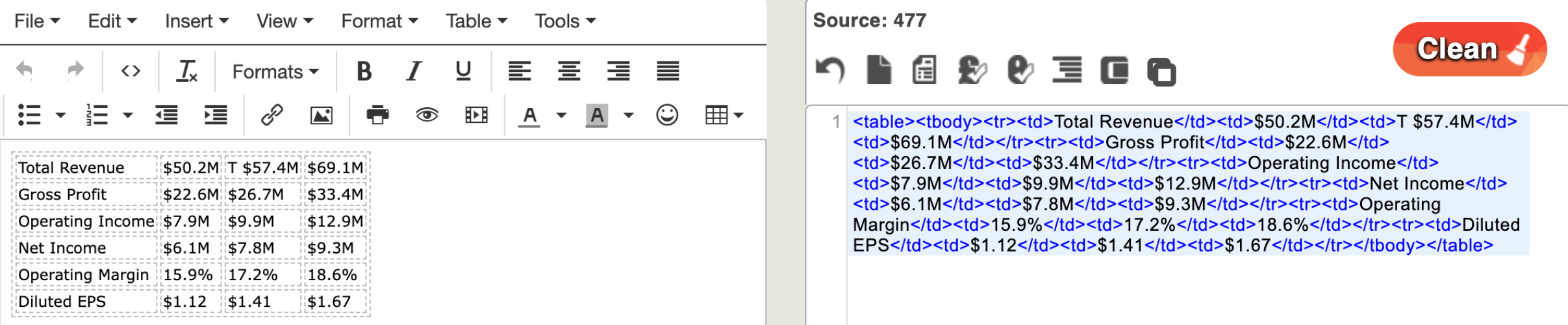
* For `Table` elements, Unstructured includes escaped JSON that represents a complete rendering of the table in HTML. To find a table element within your file, search for the string `text_as_html`.
To visually render Unstructured's HTML table representations, you can render the resulting HTML (in an online tool such as [Div Table](https://divtable.com/converter/) or [HTML-Online](https://html-online.com/html-editor/)).
 * For `Image` elements, Unstructured includes a Base64 representation of the image. To find this within your file, search for the string `image_base64`.
To convert the Base64 representation back to the original image, paste the contents of an `image_base64` element into an online tool such as [Base64 Guru](https://base64.guru/converter/decode/image).
* For `Image` elements, Unstructured includes a Base64 representation of the image. To find this within your file, search for the string `image_base64`.
To convert the Base64 representation back to the original image, paste the contents of an `image_base64` element into an online tool such as [Base64 Guru](https://base64.guru/converter/decode/image).
 The above links to third-party websites are provided solely as a convenience. We do not control, approve, or endorse the content, products, or services offered on these external sites. We assume no responsibility for your use of these external sites.
## Go further: Extract structured data
*Estimated time from downloading the file to opening the extracted data file: about 5 minutes*
Now let's see how Unstructured lets you control exactly what information gets extracted from a file, using a JSON schema and plain-language extraction guidance, rather than returning Unstructured's standard document elements.
This sample is a typical medical intake form that contains a variety of tabular data, free-form text data, and handwriting in different fonts and colors.
The above links to third-party websites are provided solely as a convenience. We do not control, approve, or endorse the content, products, or services offered on these external sites. We assume no responsibility for your use of these external sites.
## Go further: Extract structured data
*Estimated time from downloading the file to opening the extracted data file: about 5 minutes*
Now let's see how Unstructured lets you control exactly what information gets extracted from a file, using a JSON schema and plain-language extraction guidance, rather than returning Unstructured's standard document elements.
This sample is a typical medical intake form that contains a variety of tabular data, free-form text data, and handwriting in different fonts and colors.
 This script uses the [job endpoints](/api-reference/api/job/job-apis) to create the job, poll its status, and download the results. The `create job` endpoint uses a `Partitioner` node to parse the file into Unstructured's standard document elements. It then uses an `Extractor` node to pull the fields defined in the script's JSON schema into a single JSON object.
Two `Extractor` node settings shape that output:
* `output_mode` - set to `extracted_data_only` so the output contains only the schema-defined fields. See [Custom-defined output](/concepts/structured-data-extractor/data-extractor#custom-defined-output) for what that excludes.
* `extraction_guidance` - plain-language text in the `EXTRACTION_PROMPT` variable. Your schema defines which fields to extract; this guidance tells the LLM how to format and normalize the values.
Finally, the `download job output` endpoint downloads the parsed output to `OUTPUT_DIR` where you can view it as a JSON file.
Download the [example medical intake form](https://raw.githubusercontent.com/Unstructured-IO/docs-samples/main/pdf/Medical_Intake_Form.pdf).
Download the sample script
This script uses the [job endpoints](/api-reference/api/job/job-apis) to create the job, poll its status, and download the results. The `create job` endpoint uses a `Partitioner` node to parse the file into Unstructured's standard document elements. It then uses an `Extractor` node to pull the fields defined in the script's JSON schema into a single JSON object.
Two `Extractor` node settings shape that output:
* `output_mode` - set to `extracted_data_only` so the output contains only the schema-defined fields. See [Custom-defined output](/concepts/structured-data-extractor/data-extractor#custom-defined-output) for what that excludes.
* `extraction_guidance` - plain-language text in the `EXTRACTION_PROMPT` variable. Your schema defines which fields to extract; this guidance tells the LLM how to format and normalize the values.
Finally, the `download job output` endpoint downloads the parsed output to `OUTPUT_DIR` where you can view it as a JSON file.
Download the [example medical intake form](https://raw.githubusercontent.com/Unstructured-IO/docs-samples/main/pdf/Medical_Intake_Form.pdf).
Download the sample script extract-quickstart.py, or save the following script into a file.
Before you run the script, set `API_KEY`, `INPUT_DIR`, and `OUTPUT_DIR` near the top. The script already sets `API_URL` and `EXTRACTION_PROMPT` for this sample form.
* Point `INPUT_DIR` at a folder that contains only the file you want to process. The script processes every file it finds there.
* Use a different folder for `OUTPUT_DIR`. Otherwise, on a second run, the script also tries to process the JSON files it already saved there.
```python theme={null}
import json
import mimetypes
import os
import time
from unstructured_client import UnstructuredClient
from unstructured_client.models.operations import CreateJobRequest, DownloadJobOutputRequest
from unstructured_client.models.shared import BodyCreateJob, InputFiles
# ----------------------------------------------------------------------------------
# SET THE VARIABLES BELOW as they apply to you.
# ----------------------------------------------------------------------------------
# API_KEY is included here as a local variable for ease of use in this quickstart.
# This isn't best practice outside of local testing on your own machine. Once
# you've added your real key, don't share this file or check it into any
# repositories.
API_KEY = "YOUR_API_KEY_HERE"
# The local directory containing the file (or files) you want to process.
# This folder should contain only the file(s) you want to process, since the
# script processes every file it finds here.
INPUT_DIR = "/full/path/to/your/input/directory"
# The local directory where you want the results saved.
# Use a different folder than INPUT_DIR, or on a second run the script will
# also try to process the JSON files already saved here.
OUTPUT_DIR = "/full/path/to/your/output/directory"
# ----------------------------------------------------------------------------------
# Validate the variable settings
def validate_inputs(api_key, input_dir, output_dir):
if api_key in ("YOUR_API_KEY_HERE", ""):
raise SystemExit("Set API_KEY to your Unstructured API key before running this script.")
if input_dir in ("/full/path/to/your/input/directory", ""):
raise SystemExit("Set INPUT_DIR to the local directory containing the file (or files) you want to process before running this script.")
if output_dir in ("/full/path/to/your/output/directory", ""):
raise SystemExit("Set OUTPUT_DIR to the local directory where you want the results saved before running this script.")
# API_URL is already preset for you. Do not change the value.
API_URL = "https://platform-api.transform.unstructured.io/api/v1"
# EXTRACTION_PROMPT is already preset for you.
# EXTRACTION_PROMPT tells the LLM how to format, normalize, or present the values your
# schema already defines. It doesn't describe which fields to extract. The schema
# further down in this script does that.
EXTRACTION_PROMPT = "Dates are in MM/DD/YYYY format on the form. Represent them as YYYY-MM-DD. Combine the home address, city, state, and ZIP code fields into a single address string."
validate_inputs(API_KEY, INPUT_DIR, OUTPUT_DIR)
client = UnstructuredClient(
api_key_auth=API_KEY,
server_url=API_URL
)
# Step 1: Create the job.
input_files = []
for filename in os.listdir(INPUT_DIR):
full_path = os.path.join(INPUT_DIR, filename)
if not os.path.isfile(full_path):
continue
content_type, _ = mimetypes.guess_type(full_path)
input_files.append(
InputFiles(
content=open(full_path, "rb"),
file_name=filename,
content_type=content_type or "application/octet-stream"
)
)
try:
response = client.jobs.create_job(
request=CreateJobRequest(
body_create_job=BodyCreateJob(
request_data=json.dumps({
"job_nodes": [
{
"name": "Partitioner",
"type": "partition",
"subtype": "vlm",
"settings": {
"is_dynamic": True,
"allow_fast": True
}
},
{
"name": "Extractor",
"type": "structured_data_extractor",
"subtype": "llm",
"settings": {
"schema_to_extract": {
"json_schema": json.dumps({
"type": "object",
"properties": {
"patient_name": { "type": "string" },
"preferred_name": { "type": "string" },
"date_of_birth": { "type": "string" },
"phone_number": { "type": "string" },
"address": { "type": "string" },
"emergency_contact_name": { "type": "string" },
"emergency_contact_relationship": { "type": "string" },
"emergency_contact_phone": { "type": "string" },
"insurance_provider": { "type": "string" },
"reason_for_visit": { "type": "string" },
"current_medications": {
"type": "array",
"items": { "type": "string" }
},
"allergies": { "type": "string" },
"chronic_conditions": { "type": "string" },
"tobacco_use": { "type": "string" },
"alcohol_use": { "type": "string" },
"exercise_frequency": { "type": "string" }
},
"additionalProperties": False,
"required": [
"patient_name",
"preferred_name",
"date_of_birth",
"phone_number",
"address",
"emergency_contact_name",
"emergency_contact_relationship",
"emergency_contact_phone",
"insurance_provider",
"reason_for_visit",
"current_medications",
"allergies",
"chronic_conditions",
"tobacco_use",
"alcohol_use",
"exercise_frequency"
]
}),
"extraction_guidance": EXTRACTION_PROMPT
},
"provider": "openai",
"model": "gpt-5-mini",
"output_mode": "extracted_data_only"
}
}
]
}),
input_files=input_files
)
)
)
finally:
for input_file in input_files:
input_file.content.close()
job_id = response.job_information.id
print(f"Job ID: {job_id}")
# Step 2: Poll until the job completes.
while True:
response = client.jobs.get_job(request={"job_id": job_id})
job_info = response.job_information
status = job_info.status
print(f"Job status: {status.value}")
if status == "COMPLETED":
print("Job completed.")
break
elif status in ("FAILED", "STOPPED"):
raise RuntimeError(f"Job did not complete successfully: {status}")
time.sleep(10)
output_node_file_ids = [f.file_id for f in (job_info.output_node_files or [])]
# Step 3: Download the job output.
os.makedirs(OUTPUT_DIR, exist_ok=True)
for file_id in output_node_file_ids:
response = client.jobs.download_job_output(
request=DownloadJobOutputRequest(job_id=job_id, file_id=file_id)
)
output_path = os.path.join(OUTPUT_DIR, f"{file_id}.json")
with open(output_path, "w") as f:
json.dump(response.any, f, indent=4)
print(f"Saved: {output_path}")
```
```bash theme={null}
python3 extract-quickstart.py
```
The script prints its progress, then saves the extracted JSON to `OUTPUT_DIR` once the job completes.
### Review the structured data
When you parsed the financial report, Unstructured generated elements based on how the file presents the data: a title, a table, and so on. With this medical form, the `Extractor` node instead pulls the *meaning* of the data into the structure your schema defines: patient name, date of birth, and so on.
The `Extractor` node uses an LLM to populate the fields your schema defines. It returns a single JSON object holding only the data your use case needs. [Structured data extraction](/concepts/structured-data-extractor/data-extractor) like this works especially well for files with the same repeated fields, such as recurring forms or intake documents.
The sample script also uses the `Extractor` node's extraction guidance feature. The script sets `EXTRACTION_PROMPT` to format and normalize values the schema alone can't fully describe:
> Dates are in MM/DD/YYYY format on the form. Represent them as YYYY-MM-DD. Combine the home address, city, state, and ZIP code fields into a single address string.
```json theme={null}
{
"patient_name": "Margaret Elaine Whitfield",
"preferred_name": "Maggie",
"date_of_birth": "1979-04-12",
"phone_number": "(503) 555-8827",
"address": "1446 Cedar Hollow Road, Millbrook Falls, OR 97045",
"emergency_contact_name": "Harold Whitfield",
"emergency_contact_relationship": "Spouse",
"emergency_contact_phone": "(503) 555-2290",
"insurance_provider": "Cascadia Health Partners",
"reason_for_visit": "Persistent lower back pain for about three weeks, worse in the mornings and after long periods of sitting at my desk. Also would like to renew my allergy prescription.",
"current_medications": [
"Lisinopril 10mg, once daily",
"Loratadine 10mg, as needed",
"Vitamin D3 2000 IU, daily"
],
"allergies": "Penicillin; shellfish (hives, mild swelling)",
"chronic_conditions": "Mild hypertension, seasonal allergies",
"tobacco_use": "Never",
"alcohol_use": "Occasional",
"exercise_frequency": "3-4 times per week, mostly walking and yoga"
}
```
## Troubleshooting
**Symptom**: `pip install "unstructured-client>=0.46.2"` fails, for example:
```
ERROR: Could not find a version that satisfies the requirement unstructured-client>=0.46.2
ERROR: No matching distribution found for unstructured-client>=0.46.2
```
**Cause**: `unstructured-client` requires Python 3.11 or later. Check your version:
```bash theme={null}
python3 --version
```
**Fix**: Install Python 3.11 or later, for example from [python.org](https://www.python.org/downloads/) or your platform's package manager, then run the pip install command again in that Python 3.11 (or later) environment.
**Symptom**: The script exits with a `404` error from the SDK, for example:
```
unstructured_client.models.errors.SDKError: API error occurred: Status 404. Body: {"detail":"Not Found"}
```
**Cause**: You have an outdated `unstructured-client` version installed that doesn't correctly resolve `API_URL` for Transform Platform requests.
**Fix**: Upgrade to the latest version, then run the script again:
```bash theme={null}
pip install --upgrade "unstructured-client>=0.46.2"
```
**Symptom**: The script exits with `RuntimeError: Job did not complete successfully: FAILED` (or `STOPPED`).
**Cause**: The job didn't finish successfully on the Unstructured platform, for example due to a problem with the input file.
**Fix**: Use the job ID printed by the script to look up the [job details](/api-reference/api/job/get-job-details) and [failed files](/api-reference/api/job/get-job-failed-files). Resolve the issue, then run the script again.
## Next steps
Build upon this quickstart by exploring additional programmatic options, such as accessing remotely hosted file locations, tweaking output result formats, and more.
Use the API to work with [Unstructured Pipelines](/pipelines/overview), sold separately. Pipelines transforms your remotely hosted unstructured data at scale for RAG and agentic AI.
Get complete code samples and the full reference for all of Unstructured's programmatic operations.