

What's in the example file?
What's in the example file?
The file we’re going to partition contains a range of unstructured text and graphic elements, such as tables, charts, graphs, and handwriting.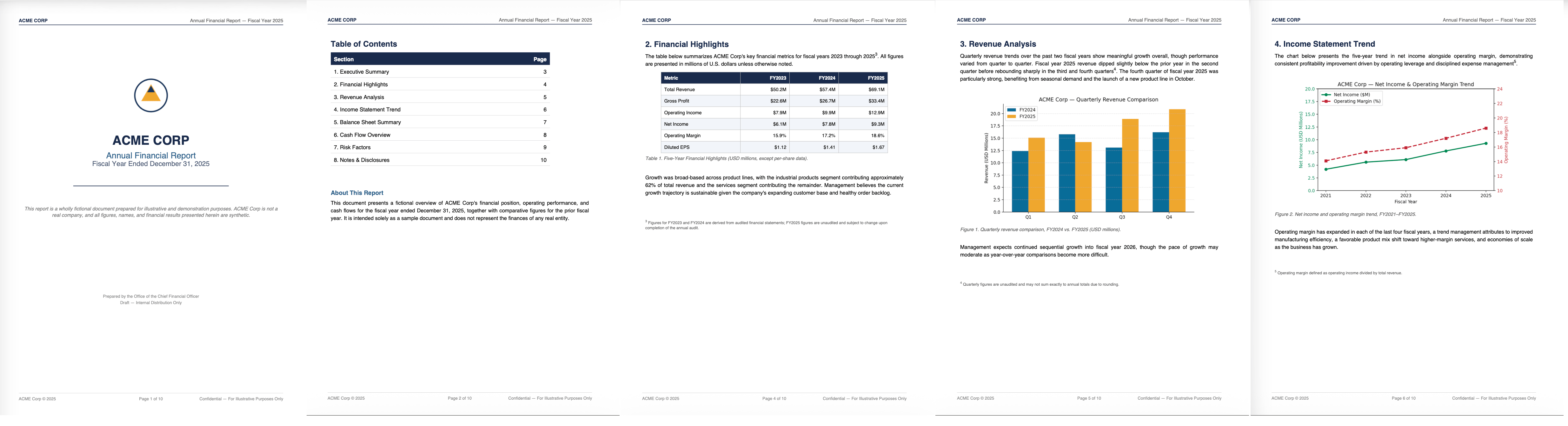
Partition the file
Estimated time from login to opening the partitioned results file: about 5 minutes1
Open Claude
2
Connect Claude to the Transform MCP
Click here to open the Unstructured Transform connector page, and then click Connect.
Can't find the connector?
Can't find the connector?
If you’re a Team or Enterprise account user, your plan Owner needs to add Unstructured Transform to your organization before you can choose it. Have them do this:
1
Click here to open your Organization settings > Connectors page and then click Browse connectors.
2
Search for the Unstructured Transform connector, select it, and click Add to your team.
3
Create your Unstructured account
When the Unstructured browser window opens, click Register and follow the on-screen directions.
4
Confirm the connection
After you’ve finished, click here to open the Connectors dialog and verify that Unstructured Transform appears in the list.Close the Connectors dialog.
5
Download the file
Download the ACME Corp Annual Report.
6
Partition the file
Give Claude the following prompt:Follow the instructions in Claude to upload the file and have Unstructured partition it.Download the JSON results once the job finishes.
Review the results
Unstructured generates a JSON file that is a collection of elements it found in the file: text, tables, images, titles, headers, footers, and more. Each element has a unique ID, as well as a a field naming the file it came from.Some common document element types
Some common document element types
Here’s a partial list of the document element types you’ll see in your partitioned JSON results:
- The metadata for each element includes coordinates for its position on the page.
-
If an element resides in another element, Unstructured includes a
parent_idin the child element to retain this relationship. -
For
Tableelements, Unstructured includes escaped JSON that represents a complete rendering of the table in HTML. To find a table element within your file, search for the stringtext_as_html. To visually render Unstructured’s HTML table representations, you can render the resulting HTML (in an online tool such as Div Table or HTML-Online).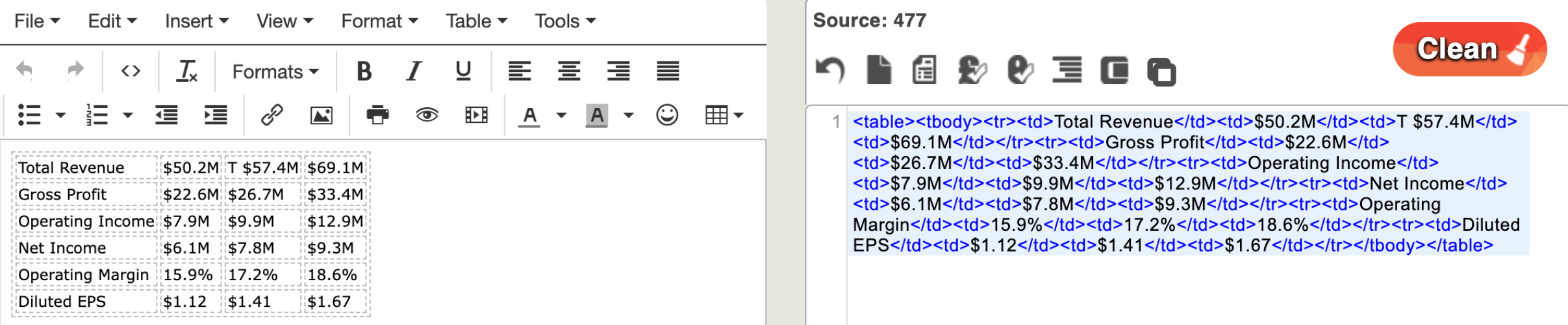
-
For
Imageelements, Unstructured includes a Base64 representation of the image. To find this within your file, search for the stringimage_base64. To convert the Base64 representation back to the original image, paste the contents of animage_base64element into an online tool such as Base64 Guru. The above links to third-party websites are provided solely as a convenience. We do not control, approve, or endorse the content, products, or services offered on these external sites. We assume no responsibility for your use of these external sites.
Go further: Extract structured data
Estimated time from downloading the file to opening the extracted data file: about 5 minutes Now let’s see how Unstructured lets you control exactly what information gets extracted from your files, and the structure, or schema, to apply to that data. You can specify the data structure you want, or have Unstructured recommend a schema based on the information it finds in your files. We’re going to have Unstructured partition one example form and suggest a schema for the data it finds.What's in the example file?
What's in the example file?
This medical questionnaire mixes tabular data, free-form text, and handwriting in several fonts and colors.
1
Download the file
Download the example medical form.
2
Extract data from the file
Give Claude the following prompt:Follow the instructions in Claude to upload the file and have Unstructured partition it.Accept the schema Unstructured suggests, and download the JSON results once the job finishes. (By default, Unstructured returns the extracted JSON inline, but the above prompt asks for a downloadable file to make reviewing the results easier.)
Review the structured data
When we partitioned the company report sample file, Unstructured generated elements based on how the file presents the data. That is, a title, a header, a table, and so on. With this medical form, Unstructured extracted the meaning of the data into a format you defined: full name, date of birth, home address, and so on. Unstructured reads the handwritten, scanned form and returns a concise data structure. It groups and nests the fields according to your specifications, so your systems can consume the output directly. While this was a single form, imagine if you had a stack of these patient forms in PDF format. This is the kind of job Unstructured is built to process at scale.Next steps
Use other AI tools
Use Unstructured with Claude Desktop, Claude Code, Cursor, Codex, Visual Studio Code, and more.
More output options
Use plain language to tweak Unstructured’s output format.
Prompting tips and tricks
Suggestions and best practices for getting Unstructured to do what you want.
Advanced extraction techniques
Extend this quickstart to extract custom data from your files in additional ways.
Auto-generate production-ready code
Ask Unstructured for the Python or cURL script that produces this output, then add it to your development environment.